🧱 The Problem: System Prompt Bloat
Most agent harnesses — especially Claude Code — ship with massive system prompts full of tool definitions you never touch. Matt discovered his prompt included entire definitions for workflow management, design sync, monitoring, and other features he simply wasn't using.
Those extra tokens aren't free — they distract the agent and slow down every single request.
🔧 What Matt Disabled
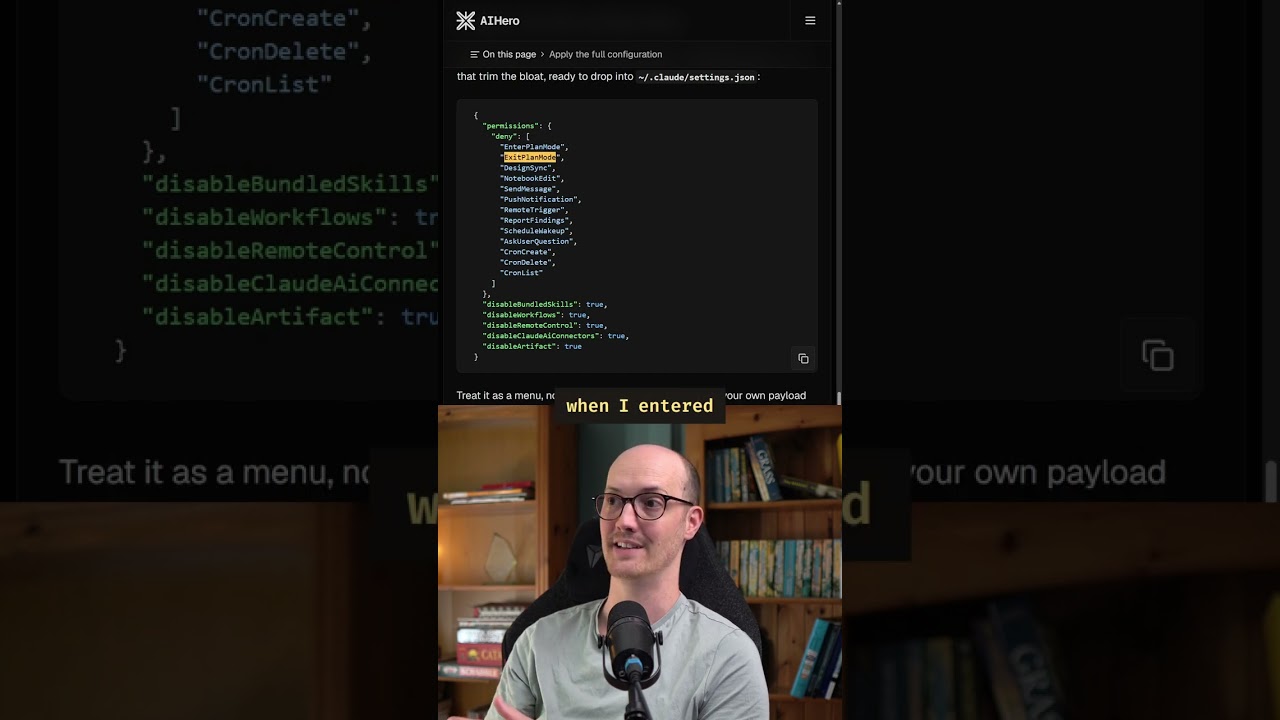
Claude Code lets you customize via global settings.json. Matt disabled all of these unused features:
"I personally really hate [the ask user tool]" — Matt on the ask user question tool. Remote control was "a lot actually in the system prompt for that." AI connectors were "burning a ton of tokens I didn't even realize."
📉 The Results: 25K → 8K Tokens
By disabling unused features, Matt achieved a dramatic reduction in system prompt size:
That's ~17,000 fewer tokens on every single request. Less noise means better outputs because the agent has less distracting context to parse through.
🔍 How to Inspect Your System Prompt
Matt wrote an article showing how to use a proxy to see exactly what's being shipped in your system prompt. This lets you:
- Audit which tools and features are consuming tokens
- Identify definitions you never trigger
- Tune
settings.jsonto keep only the bits you actually need
✨ The Principle: Less Is More
"The less you send over the wire, the better your outputs are going to be, because the agent has less stuff distracting it."
This principle extends beyond Claude Code to any agent harness. Audit your system prompt, remove what you don't use, and measure the difference. Leaner prompts → more focused agents → better results.
💡 Key Takeaways
- Claude Code's default system prompt ships at ~25K tokens — much of it unused tool definitions
- You can disable features in global settings.json to remove tool definitions from the prompt
- Matt reduced from 25K to 8K tokens (68% reduction) by disabling unused features
- Disabled: plan mode, ask user, crons, bundled skills, workflows, remote control, AI connectors, artifacts
- Use a proxy to audit what's actually in your system prompt
- Less system prompt = better outputs (less distraction for the agent)
- This principle applies to any agent harness, not just Claude Code