Overview
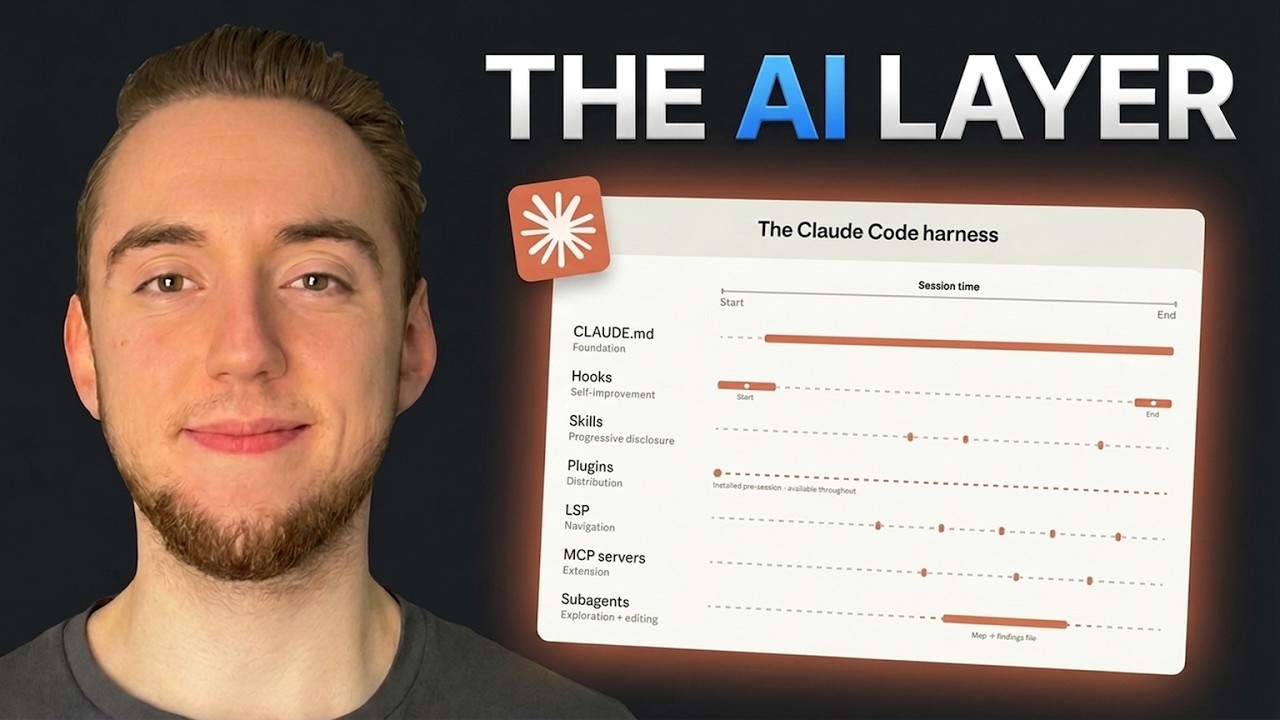
Cole Medin breaks down Anthropic's blog post on using Claude Code in large codebases. The key thesis: the harness (AI layer) matters as much as the model. He covers 7 strategies for building an effective AI layer, demonstrates each with a concrete demo codebase, and shares a Claude plugin that bundles the most useful strategies for immediate use.
1 The Problem — Large Codebases
Coding agent tutorials rarely address large codebases (tens to hundreds of thousands of lines). Strategies that work for simple projects fail as complexity grows. Anthropic published an article covering how Claude Code is used in enterprise environments: multi-million line monorepos, legacy systems, distributed architectures spanning dozens of repos.
2 The Core Thesis — Harness > Model
The harness matters as much as the model. The "AI layer" is a third component of every codebase alongside code and tests. It includes: global rules, skills, MCP servers, sub-agents, hooks, LSP, and plugins. Each of the 7 components maps to a strategy.
3 Strategy 1 — Lean & Layered Global Rules
Global rules (CLAUDE.md) are the foundation — they dictate behavior the entire session.
- Keep rules lean — studies prove thousands of lines hurts performance
- Include only: what the codebase is about, tech stack overview, general conventions/gotchas, commands for testing/dev server
- Layer rules with subdirectory
CLAUDE.mdfiles — progressive disclosure - Each subdirectory loads its own rules when Claude starts editing there
- Claude walks UP the directory tree, loading every
CLAUDE.mdit finds
4 Strategy 2 — Codebase Maps
When the directory structure doesn't tell the whole story, build a codebase map in your global rules: outline subdirectories with brief descriptions. This helps Claude discover which slice of the codebase to focus on based on the current task.
5 Strategy 3 — Self-Improving Hooks
Hooks are usually used defensively (blocking edits to certain directories). But their more valuable use is continuous improvement.
Two Hook Types Demonstrated
- Stop hook: Runs when Claude finishes a turn. Launches a separate headless Claude session to compare changes against
CLAUDE.mdrules, proposes updates in a markdown review document. Ensures rules evolve with the codebase. - Start hook: Loads dynamic context at session start — git status, unstaged changes, recent commits. Can be extended to pull from Confluence, Jira, etc.
CLAUDE.md goes stale." The stop hook creates a self-reflection process that constantly proposes updates.6 Strategy 4 — Path-Scoped Skills
Skills = reusable workflows loaded on demand (progressive disclosure). In large codebases, you may have dozens or hundreds of task types.
Critical feature most people miss: skills can be scoped to specific paths using the path parameter. Example: an "add API routes" skill only activates when editing files in the API services directory.
CLAUDE.md) = conventions and rules. Skills = workflows and processes.7 Strategy 5 — LSP via MCP Server
For massive codebases (100K+ lines), grep alone is slow and token-inefficient. Solution: expose a Language Server Protocol through a local MCP server.
This gives Claude the same navigation developers have in their IDE:
- Symbol-level search (not just string matching)
- Find definitions and references
- Type-aware navigation
monthlyTotalSense is referenced" — using where_is and find_references tools instead of grep. Result: 1 definition, 2 references with precise locations.8 Strategy 6 — Sub-Agents for Exploration
Use sub-agents to split exploration from editing. Exploration tasks (web research, codebase discovery) can consume hundreds of thousands of tokens. If the primary session does this, the context window is bloated before editing even begins.
- Pattern: dispatch exploration to sub-agents → they return summaries → primary session reasons and acts on the summaries.
- Example prompt: "Spin up three sub-agents: one for the database, one for the backend, one for the frontend. Help me figure out how to add authentication."
9 Strategy 7 — The Claude Plugin
Cole built a Claude plugin bundling the key strategies for immediate use in any codebase:
- Self-improving stop hook
- Explorer sub-agent
- Codebase search MCP server (with LSP)
- Path-scoped skill example
Installation: /plugin marketplace add <repo-path>/tooling then /plugin install helpline-ai-layer@helpline-tooling
10 Enterprise Adoption Advice
Anthropic's advice for organizations:
- Assign ownership — have a small team champion the AI layer build-out
- Start with a "quiet investment period" — build rules, skills, LSP, MCP servers
- Roll out to the organization over time
- Avoid: individual developers being disappointed without an AI layer, everyone building separate incompatible AI layers
- Goal: create a standard for consistent results across the organization
🎯 Key Takeaways
- The harness (AI layer) matters as much as the model itself
- Keep global rules lean — studies prove bloated rules hurt performance
- Layer rules with subdirectory
CLAUDE.mdfiles for progressive disclosure - Use stop hooks for self-improving
CLAUDE.mdmaintenance - Scope skills to specific paths — don't overwhelm with irrelevant context
- LSP via MCP gives Claude IDE-level navigation for large codebases
- Sub-agents should handle exploration; keep the primary session for editing
- A dedicated team should champion AI layer adoption for organizations
- "A focused agent is a performant agent" — context engineering is about just the right things
- The AI layer is now the third component of every modern codebase